Introducing Boolean Cut + Weld: Smarter Polygon Editing Without Workarounds
Boolean Cut + Weld is here! Instantly cut one polygon out of another with a single click, or merge overlapping polygons into a clean, solid shape. No more negative masks, messy workarounds, or extra editing steps—just faster workflows, cleaner results, and true-to-form polygons every time.
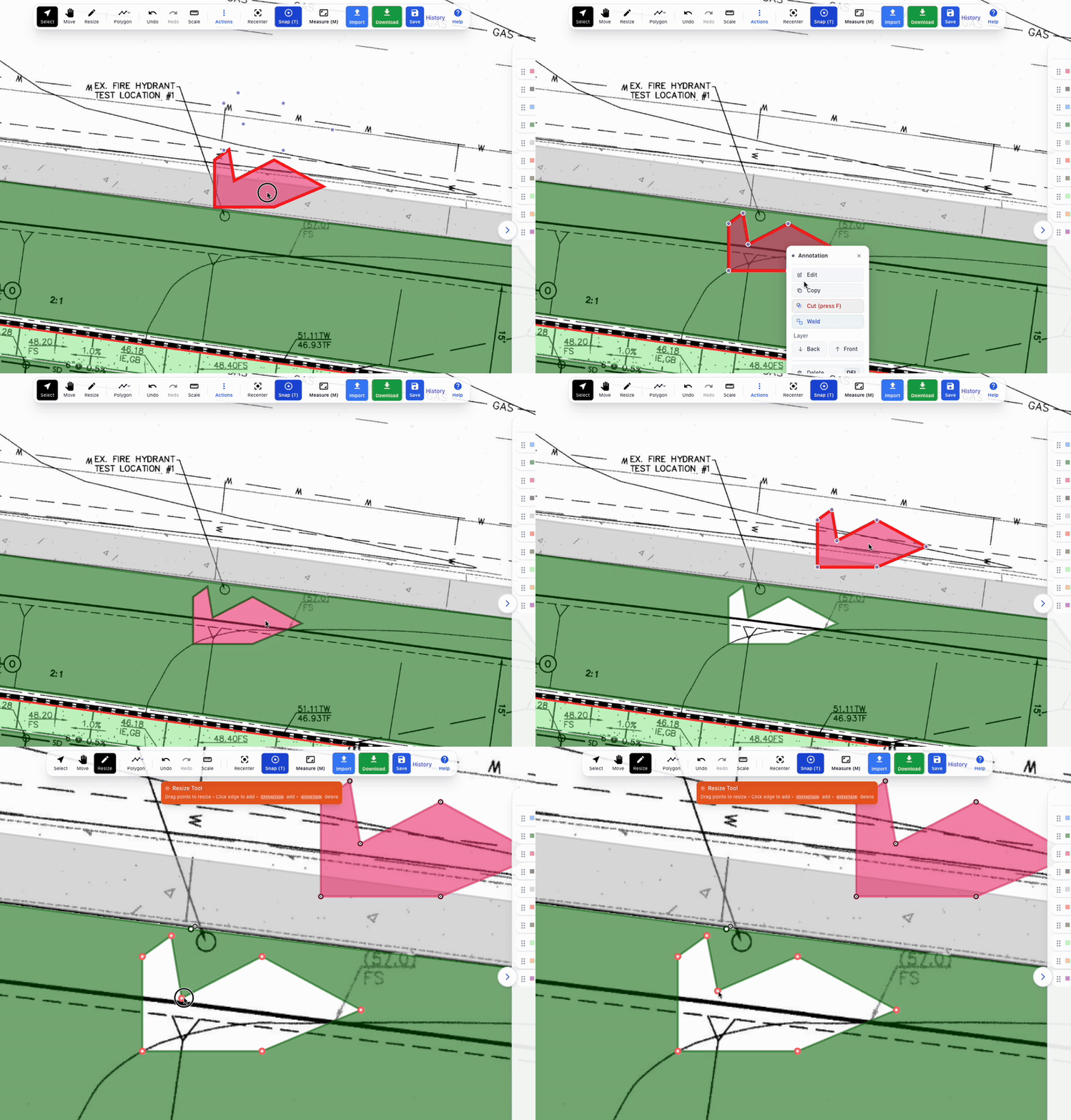
When working with polygons, one of the most common frustrations has always been cutting out shapes or merging multiple overlapping polygons. Traditionally, this meant creating “negative masks” or subtracting shapes later—extra steps that slowed you down and left room for errors.
Our latest feature update solves that with Boolean Cut + Weld, giving you faster, cleaner, and more intuitive control over your polygons.
What is Boolean Cut?
Boolean Cut allows you to place a polygon on top of another and instantly cut out the shape beneath it. Simply press the “F” shortcut and the platform will auto-cut the polygon underneath. No more duplicate layers, no more “subtract later” steps—just precise results in one click.
What is Polygon Weld?
Polygon Weld lets you merge overlapping polygons into one single, solid shape. Instead of juggling multiple pieces, Weld simplifies them into a clean, unified polygon that behaves exactly as expected.
Benefits of Boolean Cut + Weld
Save time: Eliminate messy negative masks and extra editing steps.
Work cleanly: Get true, accurate shapes without gaps or phantom edges.
More control: Edit your designs the way you think, not the way software dictates.
Better accuracy: Each polygon update is final, precise, and reliable for downstream use.
Why This Matters
In many industries—whether mapping, construction takeoffs, graphic editing, or spatial analysis—polygon accuracy is everything. Errors caused by outdated workflows create rework, frustration, and wasted time. With Boolean Cut + Weld, your shapes are now correct from the very beginning.
Common Questions (SEO-targeted)
How do I cut one polygon out of another?
What’s the difference between polygon subtraction and Boolean cut?
How do I merge polygons into one shape?
Why should I use weld instead of overlapping polygons?
Final Thoughts
Boolean Cut + Weld is designed to make polygon editing faster, cleaner, and more intuitive. No more workarounds. No more messy negatives. Just correct, solid shapes every time.
👉 Ready to try it? Log in today and see how Boolean Cut + Weld transforms your workflow.
Share this article
Help others discover this content